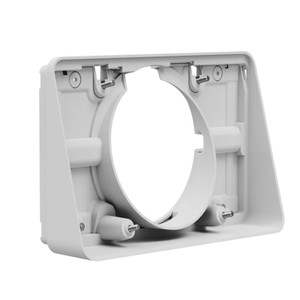
Logitech Tap Scheduler For Meeting Rooms (Off-White)
LogitechPricing available upon request
Up to 5 year(s) limited warranty against manufacturer defects from Logitech Singapore with extended warranty plans. Up to 2 year(s) with standard warranty. During the warranty period, the manufacturer's appointed authorised service centre will, at its sole discretion (a) repair the product using new or refurbished parts, (b) replace the product with a new or refurbished product.
LOGITECH TAP SCHEDULERPurpose-built scheduling panel for meeting roomsRIGHT PLACE, RIGHT TIME
* MULLION MOUNTING Secure Tap Scheduler to a door or window frame for greater visibility using the included mount.
* WALL MOUNTING Place and secure Tap Scheduler anywhere on a wall.
CABLE MANAGEMENTHide cables in the wall, mullion, or in other directions, with multiple routing options. PURPOSE-BUILT AS A SCHEDULING PANELTap Scheduler was designed for easy viewing and usability, with a spacious screen and a sleek, unobtrusive profile. Count on Tap Scheduler for reliable performance with durable components that are built to last. MAKE THE MOST OF YOUR SPACEEasily add Tap Scheduler to a variety of meeting rooms, from phone booths to video rooms to hangout nooks, helping employees quickly find the right meeting location. Simple installations and an intuitive user experience drive fast deployment and adoption. SIMPLE TO MANAGE WITH LOGITECH SYNCWith Logitech Sync, you can monitor and manage Tap Scheduler along with your other meeting room devices from one single platform.
* Anti-fingerprint: Oleophobic coating resists fingerprints for legibility.
* Durable build: Components are built to last, with the screen sealed to protect parts and withstand regular cleaning.
* Availability lighting: Green or red status lights indicate availability from a distance without distracting from the surroundings.
* Flat angle for accessibility: Tap Scheduler is mounted flat against the wall for easy reading from a variety of heights.
* Low profile install: With no offset required, Tap Scheduler mounts flush to the wall for a sleek, unobtrusive presence.
* 165 x 246.2 x 28.5 mm
* 0.7 kg (1.5 lbs)
* 165 x 246.2 x 31.4 mm
* 165 x 292.6 x 44.5 mm
* Display Type: IPS (In-Plane Switching)
* LCD Panel with LED Backlighting
* Resolution: 1280 x 800
* Viewing Angle: 85° (up/down/left/right)
* Capacitive, 10 points multi-touch
* Brightness: 400 nits
* Contrast: 1000:1
* Anti Fingerprint: Oleophobic coating
* Position Angle: 0 degrees (flat on mounting
surface)
* Mounting Pattern: 100mm x 100mm VESA FDMI
* Cable exits: horizontal / vertical / center
*Requires PoE enabled network or PoE Injector
and ethernet cable (Not included)
* WiFi: 802.11a/b/g/n/ac
* Bluetooth 5.0 (inactive, reserved for future use)
* Multi-surface mount (glass/drywall)
* Corner mount accessory
* Mullion mount
* Mounting hardware
* Documentation
Tap Scheduler makes it easy to see meeting details and reserve a room for ad hoc or future meetings. Easily deploy as a purpose-built scheduling panel for leading room scheduling solutions to help workers find and claim the right space.
MOUNTING OPTIONS* GLASS MOUNTING Secure Tap Scheduler while maintaining a clean look on both sides of the glass.* MULLION MOUNTING Secure Tap Scheduler to a door or window frame for greater visibility using the included mount.
* WALL MOUNTING Place and secure Tap Scheduler anywhere on a wall.
CABLE MANAGEMENTHide cables in the wall, mullion, or in other directions, with multiple routing options. PURPOSE-BUILT AS A SCHEDULING PANELTap Scheduler was designed for easy viewing and usability, with a spacious screen and a sleek, unobtrusive profile. Count on Tap Scheduler for reliable performance with durable components that are built to last. MAKE THE MOST OF YOUR SPACEEasily add Tap Scheduler to a variety of meeting rooms, from phone booths to video rooms to hangout nooks, helping employees quickly find the right meeting location. Simple installations and an intuitive user experience drive fast deployment and adoption. SIMPLE TO MANAGE WITH LOGITECH SYNCWith Logitech Sync, you can monitor and manage Tap Scheduler along with your other meeting room devices from one single platform.
Key Features
* 10.1” touchscreen: Easily read details and reserve a room on the spacious and responsive touchscreen.* Anti-fingerprint: Oleophobic coating resists fingerprints for legibility.
* Durable build: Components are built to last, with the screen sealed to protect parts and withstand regular cleaning.
* Availability lighting: Green or red status lights indicate availability from a distance without distracting from the surroundings.
* Flat angle for accessibility: Tap Scheduler is mounted flat against the wall for easy reading from a variety of heights.
* Low profile install: With no offset required, Tap Scheduler mounts flush to the wall for a sleek, unobtrusive presence.
Technical Specifications
Dimensions (Total Height x Width x Depth)
Device-only
* 6.5 x 9.69 x 1.12 in* 165 x 246.2 x 28.5 mm
* 0.7 kg (1.5 lbs)
Surface mounted
* 6.5 x 9.69 x 1.24 in* 165 x 246.2 x 31.4 mm
Mullion mounted
* 6.5 x 11.52 x 1.75 in* 165 x 292.6 x 44.5 mm
Touchscreen
* Size: 10.1” diagonal* Display Type: IPS (In-Plane Switching)
* LCD Panel with LED Backlighting
* Resolution: 1280 x 800
* Viewing Angle: 85° (up/down/left/right)
* Capacitive, 10 points multi-touch
* Brightness: 400 nits
* Contrast: 1000:1
* Anti Fingerprint: Oleophobic coating
* Position Angle: 0 degrees (flat on mounting
surface)
General
* Sensors: Accelerometer, Ambient light* Mounting Pattern: 100mm x 100mm VESA FDMI
* Cable exits: horizontal / vertical / center
Power & Cables
* Power over Ethernet (PoE), IEEE 802.3af Type 1, Class 3 device*Requires PoE enabled network or PoE Injector
and ethernet cable (Not included)
Ports & Interfaces
* Ethernet: 10/100mbps* WiFi: 802.11a/b/g/n/ac
* Bluetooth 5.0 (inactive, reserved for future use)
What's Included
* Logitech Tap Scheduler* Multi-surface mount (glass/drywall)
* Corner mount accessory
* Mullion mount
* Mounting hardware
* Documentation
- Product Type:
- Video Conferencing
- Meeting Room Size:
- Small
- Meeting Room Size:
- Medium
- Meeting Room Size:
- Large